Telos Alliance Telos Alliance
  • SOLUTIONS
    • TV Solutions
    • Radio Solutions
    • Media Solutions
  • APPLICATIONS
    • Audio Delays
      • 25-Seven PDM II
      • 25-Seven PDMX
    • Consoles & Audio Mixing
      • Broadcast Consoles
        • Axia Quasar Family
          • Axia Quasar XR
          • Axia Quasar SR
          • Axia Quasar Soft
          • Axia Quasar Engine
          • Axia Quasar Engine RPS
          • Axia Quasar Family Accessories
        • Axia Pulsar
        • Axia Altus
        • Axia Altus SE
        • Axia iQ Family
          • Axia iQ
          • Axia iQx
          • Axia iQ Expansion Frames
        • Axia RAQ
        • Axia Core Soft
        • Axia DESQ
        • Axia IP-Tablet Virtual Radio Software
          • IP-Tablet Core
          • IP-Tablet xNodes
          • IP-Tablet iQ Family
          • IP-Tablet StudioEngine
          • IP-Tablet VX Family
          • IP-Tablet Omnia.9
          • IP-Tablet Powerstation
      • Integrated Console Engines
        • Axia Quasar Engine
        • Axia Quasar Engine RPS
        • Axia StudioCore
        • IP-Tablet PowerStation
        • Axia QOR.16
        • IP-Tablet iQ Family
        • IP-Tablet StudioEngine
      • Accessories
        • Axia-Approved Ethernet Switches
        • Axia iPlay Network Stream Player for Windows
        • Axia iProfiler Automated Program Archiving
        • Axia iProbe IP-Audio Network Management Software
        • Axia Livewire+ AES67 IP Audio Driver
        • Axia Routing Control Panels
        • Axia Studio Control Panels
        • Axia xSelector
    • Distributed & Decentralized Routing
      • Audio Interfaces
        • Telos Alliance xNode2
          • Telos Alliance Analog xNode2
          • Telos Alliance AES/EBU xNode2
          • Telos Alliance Microphone xNode2
          • Telos Alliance Mixed Signal xNode2
          • Telos Alliance GPIO xNode2
          • IP-Tablet xNode Software
          • Omnia MPX Node
          • Telos Alliance SDI AoIP Node
        • Axia StudioEdge
        • Jünger Audio AIXpressor
      • Routing & Monitoring
        • Axia xSelector
        • XY Router Control Panel
        • Axia Pathfinder Core PRO Broadcast Controller
        • Axia Routing Control Panels
    • File-Based Audio Processing
      • Radio
        • Podcasting & On-Demand
          • OmniaTools
      • TV
        • Audio Automation for Enterprise
          • Minnetonka AudioTools Server
        • Loudness & Workflows
          • Minnetonka AudioTools FOCUS
          • Minnetonka AudioTools Carbon
    • IP Intercom & Communications
      • IP Intercom
        • Telos Infinity IP Intercom System
          • VIP Virtual Intercom Platform
          • Panels
          • Desktop Station
          • Beltpacks
          • Wired Headset
          • Dashboard Enterprise Software
          • Infinity Link Software
    • Broadcast Phone Systems
      • VoIP Broadcast Phone Systems
        • Telos VX
          • Telos VX Enterprise
          • Telos VX Duo
          • Telos VXs for Radio
          • Telos VXs for TV
          • IP-Tablet VX Family
      • Broadcast Phone Systems
        • Telos Hx1 & Hx2 Digital Hybrids
        • Telos VSet Phone
    • Radio Processing
      • Radio Processors
        • Omnia XII
        • Omnia.11
        • Omnia.9
        • Omnia VOLT
        • Omnia Forza Family
        • Omnia Forza
        • Omnia Enterprise
          • Omnia Enterprise 9s
        • IP-Tablet Omnia.9
      • Audio Interfaces
        • Omnia MPX Node
        • Omnia µMPX Software
      • Microphone Processors
        • Jünger D*AP4 VAP
        • Jünger AIXpressor
    • Signal Distribution & Format Conversion
      • Audio Interfaces
        • Telos Alliance Analog xNode2
        • Telos Alliance AES/EBU xNode2
        • Telos Alliance Microphone xNode2
        • Telos Alliance Mixed Signal xNode2
        • Telos Alliance GPIO xNode2
        • Telos Alliance SDI AoIP Node
        • IP-Tablet xNode Software
        • Jünger AIXpressor
        • Omnia MPX Node
      • Axia StudioEdge
      • Livewire+ AES67
        • Axia Livewire+ AES67 IP Audio Driver
    • Site-to-Site-to-Site Connectivity
      • Codecs & Transceivers
        • Telos iPort High Density Multi-Codec Gateway
        • Telos Zephyr Connect
        • Telos Z/IP ONE
      • IP Intercom
        • Infinity Link Software
    • Stream Encoding & Processing
      • Stream Encoding & Processing
        • Telos Alliance Z/IPStream Family
        • Telos Alliance Z/IPStream R/1
        • Telos Alliance Z/IPStream X/20
        • Telos Alliance Z/IPStream R/20
        • Omnia Forza Family
        • Omnia Forza
    • Studio Essentials
      • Studio Essentials Family
      • Axia Altus SE
      • Telos VX Duo
    • On-Air TV Audio Processing
      • Dolby Encoding, Decoding, & Transcoding
        • Linear Acousitc AERO.200
        • Linear Acoustic AERO.2400
        • Linear Acoustic AERO.8000
        • Linear Acoustic AERO.enterprise
        • Linear Acoustic LA-5291
        • Linear Acoustic LA-5300
        • Jünger D*AP8 MAP
        • Jünger D*AP8 TAP
        • Jünger AIXpressor
        • Jünger Audio flexAIserver
      • Monitoring
        • Linear Acoustic AMS
        • Linear Acoustic LA-5300
      • NextGen TV & Immersive Audio
        • Linear Acoustic AMS
        • Linear Acoustic LA-5291
        • Linear Acoustic LA-5300
        • Linear Acoustic UPMAX ISC
      • TV Loudness Control
        • Linear Acoustic AERO.20
        • Linear Acoustic AERO.200
        • Linear Acoustic AERO.2400
        • Linear Acoustic AERO.8000
        • Linear Acoustic AERO.enterprise
        • Linear Acoustic AMS
        • Linear Acoustic LA-5300
        • Jünger D*AP4 LM
        • Jünger D*AP4 FLX
        • Jünger D*AP8 FLX
        • Jünger D*AP8 MAP
        • Jünger D*AP8 TAP
        • Jünger EASY LOUDNESS AoIP
        • Jünger EASY LOUDNESS SDI
        • Jünger AIXpressor
        • Jünger Audio flexAIserver
      • Upmixing
        • Linear Acoustic UPMAX ISC
        • Linear Acoustic LA-5300
        • Linear Acoustic AERO.20
        • LInear Acoustic AERO.200
        • Linear Acoustic AERO.2400
        • Linear Acoustic AERO.8000
        • Linear Acoustic AERO.enterprise
        • Linear Acoustic AMS
        • Jünger D*AP8 MAP
        • Jünger D*AP8 TAP
        • Jünger AIXpressor
        • Jünger Audio flexAIserver
      • Watermarking
        • Linear Acoustic AERO.200
        • Linear Acoustic AERO.2400
        • Linear Acoustic AERO.8000
        • Linear Acoustic AERO.enterprise
        • Linear Acoustic LA-5300
      • Voice Processing
        • Jünger AIXpressor
        • Jünger Audio flexAIserver
    • Watermarking Monitoring & Enhancement
      • Radio Watermarking
        • 25-Seven Voltair
      • TV Watermarking
        • Linear Acoustic AERO.200
        • Linear Acoustic AERO.2400
        • Linear Acoustic AERO.8000
        • Linear Acoustic LA-5300
    • Software as a Service
      • Spotlight SaaS
    • Livewire+ Networking and Partnerships
      • Livewire+ AES67 AoIP Networking
      • Livewire Partners
        • Livewire Hardware & Software Partners
  • PRODUCTS
      Radio TV
    • Radio Processors
      • Omnia XII
      • Omnia.11
      • Omnia.9
      • Omnia VOLT
      • Omnia Forza Family
      • Omnia Forza
      • Omnia Enterprise 9s
      • Omnia.9 IP-Tablet Software
      • Omnia MPX Node
    • File-Based Audio Processing
      • OmniaTools
    • Broadcast Phone Systems
      • Telos VX Family
      • Telos VX Enterprise VoIP Phone System
      • Telos VX Duo VoIP Phone System
      • Telos VXs Virtual VoIP System for Radio
      • Telos Hx1 & Hx2 Digital Hybrids
      • Telos VSet Receiver
      • Telos VX Family IP-Tablet Software
    • Streaming Audio
      • Telos Alliance Z/IPStream Family
      • Telos Alliance Z/IPStream R/1
      • Telos Alliance Z/IPStream X/20
      • Telos Alliance Z/IPStream R/20
      • Omnia Forza Family
      • Omnia Forza
    • Software as a Service
      • Spotlight SaaS
    • Broadcast Mixing Consoles
      • Axia Quasar Family
      • Axia Quasar XR
      • Axia Quasar SR
      • Axia Quasar Engine RPS
      • Axia Quasar Soft
      • Axia Quasar Family Accessories
      • Axia Pulsar
      • Axia Altus
      • Axia Altus SE
      • Axia iQ Family
      • Axia iQx
      • Axia iQ
      • Axia iQ Expansion
      • Axia DESQ
      • Axia RAQ
      • Axia Core Soft
    • Audio Delays
      • 25-Seven Program Delay Manager II
      • 25-Seven PDMX
    • Codecs & Transceivers
      • Telos iPort High Density Multi-Codec Gateway
      • Telos Zephyr Connect
      • Telos Z/IP ONE IP Broadcast Codec
    • Watermarking
      • 25-Seven Systems Voltair
    • Mixing Console Engines
      • Axia Quasar Engine
      • Axia Quasar Engine RPS
      • Axia StudioCore
      • Axia QOR.16
    • IP Intercom
      • Infinity IP Intercom Family
      • Telos Infinity IP Intercom Panels
      • Telos Infinity IP Intercom Beltpacks
      • Telos Infinity IP Intercom Desktop Station
      • Telos Infinity Link IP Intercom Software
      • Telos Infinity IP Dashboard Enterprise Software
      • Telos Infinity VIP - Virtual Intercom Platform
      • Telos Infinity IP Intercom Lite Single Ear Wired Headset
    • Routers & Monitors
      • Axia xSelector
      • Axia Pathfinder Core PRO Broadcast Controller
      • XY Router Control Panel
      • Axia-Approved Ethernet Switches
      • Axia Routing Control Panels
    • Legacy Products
      • Telos Systems Legacy Products
      • Omnia Audio Legacy Products
      • Axia Audio Legacy Products
      • 25-Seven Systems Legacy Products
    • Accessories for Consoles and Audio Mixing
      • Axia IP-Tablet Virtual Radio Software
      • Axia iPlay Network Stream Player for Windows
      • Axia iProfiler Automated Program Archiving
      • Axia Livewire+AES67 IP-Audio Driver
      • Axia xSelector
      • XY Router Control Panel
      • Axia Routing Control Panels
      • Axia Studio Control Panels
      • Axia-Approved Ethernet Switches
      • Axia iProbe IP-Audio Network Management Software
    • AoIP Audio Interfaces
      • Telos Alliance Audio Interfaces Family
      • Axia StudioEdge
      • Telos Alliance Analog xNode2
      • Telos Alliance AES/EBU xNode2
      • Telos Alliance Microphone xNode2
      • Telos Alliance Mixed Signal xNode2
      • Telos Alliance GPIO xNode2
      • Omnia µMPX Software
      • Axia IP-Tablet xNodes Software
      • Jünger AIXpressor
    • Microphone Processors
      • Jünger D*AP4 VAP Voice Audio Processor
      • Jünger AIXpressor
    • Studio Essentials
      • Studio Essentials Family
      • Axia Altus SE
      • Telos VX Duo
    • Dolby Encoders, Decoders & Transcoders
      • Linear Acoustic LA-5291 Professional Audio Encoder
      • Linear Acoustic LA-5300 Broadcast Audio Processor
      • Linear Acoustic AERO.200
      • Linear Acoustic AERO.2400
      • Linear Acoustic AERO.8000 Audio Processing Platform
      • Linear Acoustic AERO.enterprise DTV Audio Processing Software
      • Jünger D*AP8 MAP Audio Processor
      • Jünger D*AP8 TAP Audio Processor
      • Jünger flexAI Family
      • Jünger AIXpressor
      • Jünger Audio flexAIserver
    • File-Based Loudness & Workflows
      • Minnetonka AudioTools FOCUS
      • Minnetonka AudioTools Server
    • NextGen TV & Immersive Audio
      • Linear Acoustic UPMAX ISC Immersive Soundfield Controller
      • Linear Acoustic AMS Authoring & Monitoring System
      • Linear Acoustic LA-5300 Broadcast Audio Processor
      • Linear Acoustic LA-5291 Professional Audio Encoder
    • Codecs & Transceivers
      • Telos iPort High Density Multi-Codec Gateway
      • Telos Z/IP ONE IP Broadcast Codec
    • VoIP Broadcast Phone Systems
      • Telos VX Family
      • Telos VX Enterprise VoIP Phone System
      • Telos VX Duo VoIP Phone System
      • Telos VXs Virtual VoIP System for TV
      • Telos VSet Receiver
      • Telos VX Family IP-Tablet Software
    • IP Intercom
      • Infinity IP Intercom Family
      • Telos Infinity IP Intercom Panels
      • Telos Infinity IP Intercom Beltpacks
      • Telos Infinity IP Intercom Desktop Station
      • Telos Infinity IP Intercom Lite Single Ear Wired Headset
      • Telos Infinity Link IP Intercom Software
      • Telos Infinity IP Dashboard Enterprise Software
      • Telos Infinity VIP - Virtual Intercom Platform
    • Upmixing
      • Linear Acoustic UPMAX ISC Immersive Soundfield Controller
      • Linear Acoustic LA-5300 Broadcast Audio Processor
      • Linear Acoustic AERO.20
      • Linear Acoustic AERO.200
      • Linear Acoustic AERO.2400
      • Linear Acoustic AERO.8000 Audio Processing Platform
      • Linear Acoustic AERO.enterprise
      • Linear Acoustic AMS Authoring & Monitoring System
      • Jünger D*AP8 MAP Audio Processor
      • Jünger D*AP8 TAP Audio Processor
      • Jünger flexAI Family
      • Jünger AIXpressor
      • Jünger Audio flexAIserver
    • OEM Solutions
      • Telos Alliance OEM Solutions
      • Minnetonka Audio OEM Software
    • AoIP Audio Interfaces
      • Telos Alliance Audio Interfaces Family
      • Telos Alliance SDI AoIP Node
      • Telos Alliance Analog xNode2
      • Telos Alliance AES/EBU xNode2
      • Telos Alliance Microphone xNode2
      • Telos Alliance Mixed Signal xNode2
      • Telos Alliance GPIO xNode2
      • Omnia µMPX Software
      • Jünger AIXpressor
      • XY Router Control Panel
    • Audio Processing Monitors
      • Linear Acoustic LA-5300 Broadcast Audio Processor
      • Jünger D*AP8 MAP Audio Processor
    • Watermarking
      • Linear Acoustic AERO.200
      • Linear Acoustic AERO.2400
      • Linear Acoustic AERO.8000 Audio Processing Platform
      • Linear Acoustic AERO.enterprise
      • Linear Acoustic LA-5300 Broadcast Audio Processor
    • Legacy Products
      • Linear Acoustic Legacy Products
    • Loudness Controllers
      • Linear Acoustic AERO.20
      • Linear Acoustic AERO.200
      • Linear Acoustic AERO.2400
      • Linear Acoustic AERO.8000 Audio Processing Platform
      • Linear Acoustic AERO.enterprise
      • Linear Acoustic AMS Authoring & Monitoring System
      • Linear Acoustic LA-5300 Broadcast Audio Processor
      • Jünger D*AP4 FLX Audio Processor
      • Jünger D*AP4 LM Audio Processor
      • Jünger D*AP8 FLX Audio Processor
      • Jünger D*AP8 MAP Audio Processor
      • Jünger D*AP8 TAP Audio Processor
      • Jünger EASY LOUDNESS AoIP Audio Processor
      • Jünger EASY LOUDNESS SDI Audio Processor
      • Jünger flexAI Family
      • Jünger AIXpressor
      • Jünger Audio flexAIserver
    • Microphone Processors
      • Jünger D*AP4 VAP Voice Audio Processor
    • Broadcast Mixing Consoles
      • Axia Quasar Family
      • Axia Quasar XR
      • Axia Quasar SR
      • Axia Pulsar
    • Software as a Service
      • Spotlight SaaS
  • RESOURCES
    • Blog
    • Download Center
    • Digital Catalog
    • Legacy Products
    • Careers
  • SUPPORT
    • Support Home Page
    • Support Request
    • TelosCare
    • Warranty
    • Product Registration
    • Download Center
    • Pay Your Invoice
    • TelosHelp
  • EVENT HUB
    • 2026 IBC Show
    • Events
    • Container University
    • Webinars On-Demand
  • BUY NOW

Minnetonka AudioTools Server

  1. Home
  2. Minnetonka AudioTools Server
Minnetonka AudioTools Server
WorkflowCreator_23_BOS_TVT
pro_ATS®_carousel.png
DPVM600_carousel.jpg
ATS_QueueControl_Carousel.png
WorkflowCreator_TVTBOS23
ATS_Operator_Carousel.png
ATS_Vantage_Connector_Carousel.png
ATS_WebClient_Carousel.png
  • Overview
  • Features
  • In Depth
  • System Requirements
  • Videos

Minnetonka AudioTools SERVER Overview

Quality-First Audio Automation

Minnetonka Audio® AudioTools® Server automates a comprehensive range of file-based audio processing tasks, from routine level adjustments to intricate multi-program delivery profiles. It is ideally suited for linear broadcast platforms like cable, satellite and terrestrial, modern digital networks including OTT, IPTV and radio, and commercial post-production facilities. Built as a pure software platform, it runs seamlessly on commodity hardware, virtualized systems, or cloud deployments such as Amazon AWS.

By consolidating loudness regulation, codec management, automated mixing and quality control into flexible, automated workflows, AudioTools Server gives enterprise operations the agility to scale dynamically. This integrated approach dramatically reduces operational overhead while ensuring absolute compliance and uncompromised audio quality.

  • State-of-the-Art Processing: Transparent audio processing and loudness control across broadcast and streaming platforms.

  • AI/ML-Driven Modules: Next Generation Audio processing, including language detection, dialog intelligibility, and source separation.

  • Compliance Made Simple: Industry-leading loudness measurement and correction built to meet international broadcast standards and accessibility targets.

  • Enterprise-Grade Automation: Runs invisibly in the background via Windows Services and is designed for unattended operation

  • Industry Standard: Trusted by major broadcasters, post-production houses and streaming platforms globally.

Enterprise Integration & Scalability

Driven by highly customizable XML profiles, AudioTools Server features a modern REST API to easily connect with industry-standard Workflow Automation and Media Asset Management (MAM) ecosystems. From small post-houses processing a handful of files per week, to enterprise facilities scaling across cloud instances with floating licenses, its architecture grows perfectly with your operation.

Some of our Strategic Partners

Minnetonka AudioTools SERVER Features

Your Complete Audio Toolbox

AudioTools Server features a comprehensive range of audio processing options. Its modular architecture keeps your toolset current and unlocks powerful workflow design. Facilities can build sequential or highly conditional profiles that combine these modules to match their exact deliverable requirements in a single pass.

  • Loudness Control & Compliance: State-of-the-art loudness control based on international standards and practices. Advanced Loudness Adaptation workflows ensure compliance and improved dialog intelligibility, specifically tailored for high-dynamic-range (HDR) content.

  • Immersive & Next-Gen Audio: Automate Dolby® Atmos encoding and MPEG-H pre-processing, with upmixing capabilities up to 9.1.6 channels.

  • AI/ML-Driven Processing: Leverage AI modules for language detection, dialog intelligibility and source separation.

  • Codecs & File Handling: Manage all major audio codecs, including Dolby E, Dolby Digital Plus, MP2, MP3 and AAC, with support for encoding, decoding and transcoding. Extract and rewrap audio essences from video containers such as MXF, QuickTime and MPEG Transport Streams, with channel management tools for manipulating the layout of the final output files.

  • Automation & Editorial Utilities: Streamline workflows with auto-mix/auto-ducking features for voiceovers and audio descriptions. Perform essential editorial tasks such as upmixing, downmixing, time stretching, pitch shifting, and segment trimming and stitching.

  • Quality Control: Audio-specific QC, including channel assignment detection, silence detection, phase analysis and correlation checks.

  • Radio Processing: Omnia® Forza and Omnia.9 radio-style processing makes on-demand podcasts sound like polished broadcasts.

For a detailed explanation of all available processing modules, please expand the “Brochures” section in the right side menu, and click on “AudioTools Server Module Specifications.”

Minnetonka AudioTools SERVER In Depth

The AudioTools Workflow Engine

At its foundational layer, AudioTools Server is driven by a highly customizable XML-scripted architecture. Every input and output parameter, processing step, results analysis and logic test is translated into a structured XML workflow. 

This code-first approach allows the application to be highly customizable, offering infinite flexibility. It also provides seamless integration with enterprise workflow-orchestration tools via the AudioTools REST API, enabling external systems to dynamically manipulate specific workflow parameters inside the XML just prior to submission, and effortlessly pull detailed results, compliance metrics and logging back from the workflow on completion.

AudioTools WorkflowCreator: Bridging Design and Code

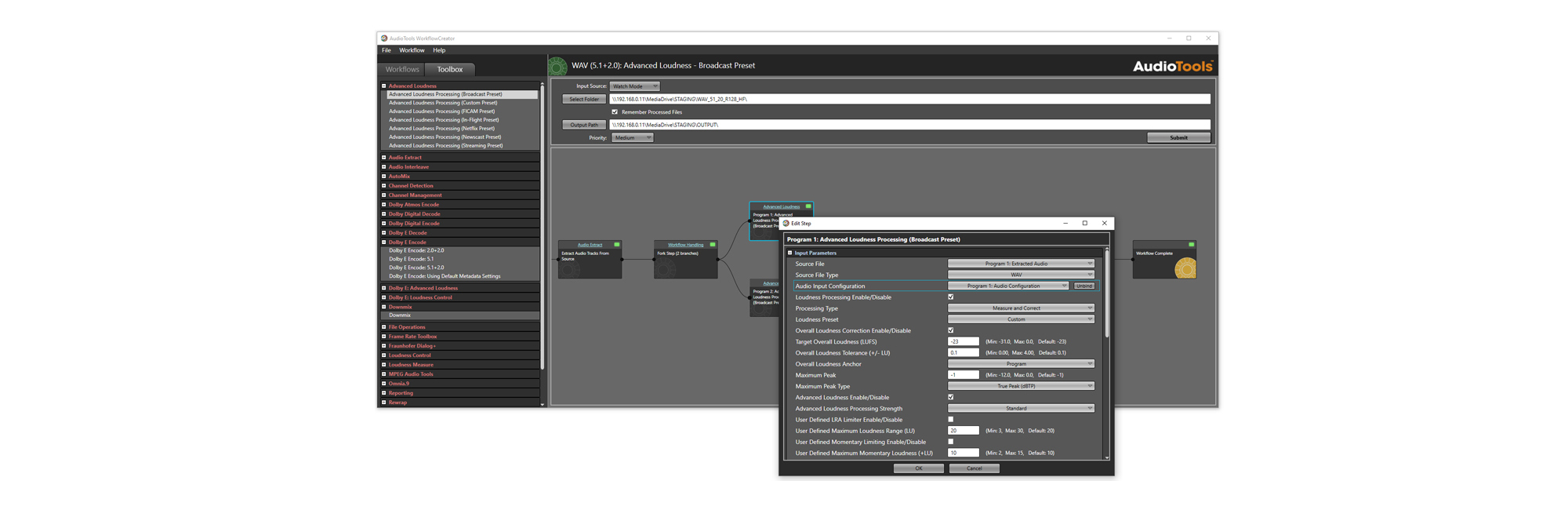
AudioTools WorkflowCreator bridges the gap between raw code and intuitive operational design, allowing anyone to wield the full power and sophistication of AudioTools Server via an easy-to-use graphical user interface.

  • Building Made Simple: New workflows can be easily created simply by dragging and dropping steps onto the workflow canvas from the comprehensive module toolbox - no need to touch the underlying XML code. Modifying workflows is also simple, making it possible to add, delete, or rename steps in just a few clicks.

  • Advanced Parameter Management: Each step comes with its own set of controllable parameters that can be adjusted to meet requirements. Individual parameters can also be bound to upstream (customizable) references, or can be copied en masse between steps.

  • Powerful Workflows Need Powerful Tools: Fork processing into parallel branches to maximize efficiency, or use Logic Steps to drive decision-making based on preceding results. Easily derive new workflow parameters through calculations and conditional tests. Plus custom reporting, email notifications, file management and more - all possible with just a few clicks.

  • 1000+ Pre-Configured Templates: Get started quickly using the extensive, searchable library of workflow templates. Each template is fully editable, so it can be tailored to your exact requirements in minutes.

  • Flexible Submission Options: Files and watch folders can be submitted to the server for processing directly from the WorkflowCreator interface, or workflows can be exported for submission via third-party tools, such as Telestream Vantage, or web services integration.

AudioTools Operator: Simplified Control

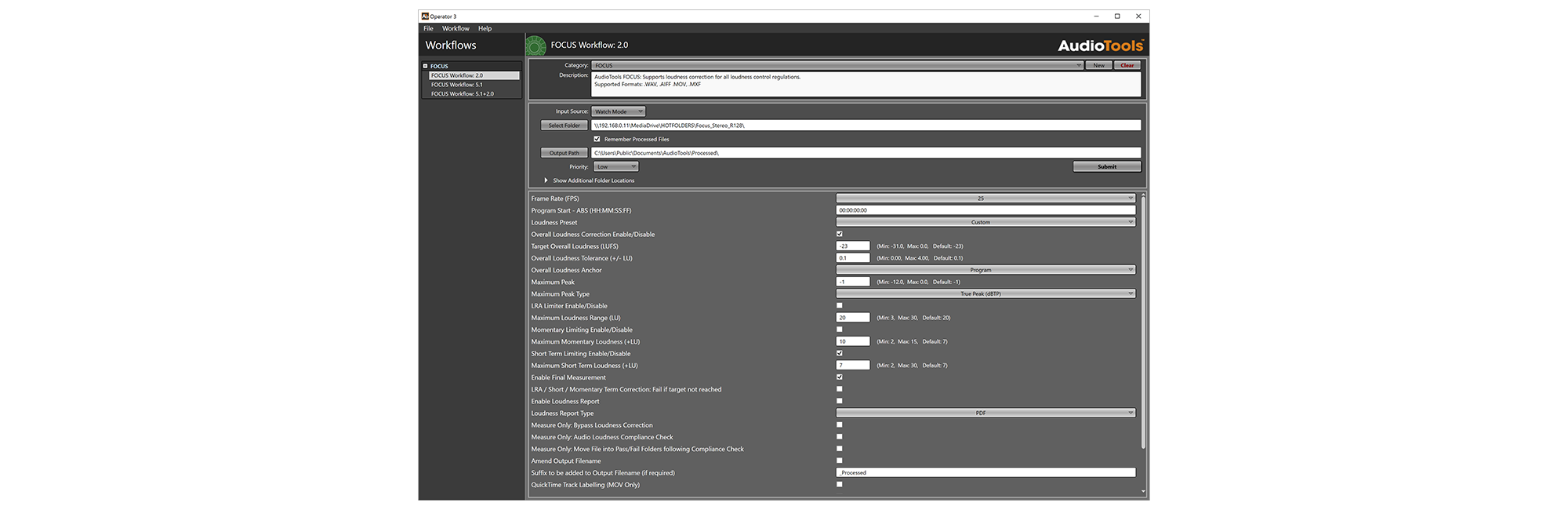
For simple manual operations, the AudioTools Operator application offers a streamlined interface that handles file submission and parameter adjustment from a single, easily digestible page. Its intuitive design allows non-technical staff, tape-room technicians, or editors to easily adjust any targets, such as loudness settings or Dolby metadata, prior to submitting a job. Administrators can completely customize which specific parameters are visible, or even engage a “Read-Only” mode to ensure regular users never overwrite standardized facility settings.

Once targets are set, users can process media immediately using manual File Mode or activate a live Watch Folder that automatically triggers processing as new assets arrive. Users can also export profiles directly to the Job Queue WebUI to launch jobs remotely from any network browser. This combination of hands-on simplicity and automated flexibility makes AudioTools Operator the primary control interface for the AudioTools FOCUS product family.

Monitoring Tools

Queue Control

Queue Control is a versatile desktop client application that serves as the central command and control hub for the AudioTools Server system. As a queue monitoring tool, it allows users to track the status of any submitted jobs, offering direct access to detailed results information and troubleshooting logs. Queue Control also acts as the primary interface for managing the system's underlying architecture, allowing administrators to configure local node settings, as well as link remote nodes for specialized roles such as license sharing and load-balancing.

Job Queue WebUI

With a completely redesigned interface for AudioTools Server Version 7, the AudioTools Job Queue WebUI brings the platform's browser-based client into visual alignment with the clean, unified look of the wider Telos Alliance® ecosystem. Its lightweight dashboard allows operators to track the state of running processes, view measurement results and access detailed logging from any network-connected browser or mobile device without requiring administrator access. The WebUI also serves as a flexible remote workspace where authorized users can submit new workflows or stop executing processes, with a password-protected administrative area available for managing advanced local controls.

REST API Monitoring

In addition to the built-in tools, the AudioTools REST API provides a comprehensive toolset of controls that allows users to implement their own customized queue monitoring tools or seamlessly integrate tracking directly into a facility's pre-existing asset management software.

Minnetonka AudioTools SERVER System Requirements

The overall performance of an AudioTools Server processing node depends on several factors. Some processes rely more heavily upon CPU resources, and others are more dependent on network/storage speed. To get the best performance, AudioTools Server relies on a combination of a fast network storage connection, high CPU clock speeds, and fast local storage for scratch and temporary files. See below for details.

Operating System

Recommended Operating Systems:

  • Microsoft Windows Server 2016

  • Microsoft Windows Server 2019

  • Microsoft Windows Server 2022

  • Microsoft Windows Server 2025

  • Microsoft Windows 10 Pro

  • Microsoft Windows 11 Pro

Note: We recommend using Windows Server 2022 (or Windows 11 Pro) as the minimum operating system for any new installation.

These operating system requirements apply to all supported deployment methods: Physical server, virtual machines as in VMWare and HyperV, or cloud deployments as in Amazon AWS.

CPU 

  • Architecture: x86-64 (64-bit), required for OS.

Note: The application itself is a 32-bit (x86) process; CPU selection can prioritize higher clock speeds and core counts over large L3 caches or multi-socket scalability.

  • Minimum: 8 cores at 3.5 GHz (modern CPUs)

  • Recommended: 16 cores at 4 GHz or higher; 

Note: The number of cores should be proportionate to the number of simultaneous processes expected. E.g. 8 cores for 4 jobs, 16 cores for 10 jobs etc.

Example Models: 

Minimum:

  • Intel® Core™ i5 (13400/14400 or newer)
  • AMD Ryzen™ 7 (5700X/7700 or newer)

Recommended (High Throughput): 

  • Intel® Core™ i7 (13700/14700 or newer)
  • AMD Ryzen™ 9 (7900 or newer)

Note: Comparable recent server-class CPUs (Xeon, EPYC) are also supported.

Memory

  • Minimum: 16GB RAM
  • Recommended: 24-32GB RAM

For processing large media files (e.g., QuickTime, MXF) or in high concurrency workloads, more RAM will improve reliability and performance.

Network Storage

When media files are processed directly from shared network storage (e.g. NAS or SAN):

  • Bandwidth: A dedicated high-speed connection is required - ideally 10GbE (10 Gigabit Ethernet) or faster for NAS, or a direct Fibre Channel connection for SANs.

Where a high-speed connection to fast, shared storage is not available, consider copying the source media files to the AudioTools Server node and processing them locally.

Local Storage

AudioTools Server creates temporary files during processing. To minimize network traffic and maximize throughput, we recommend configuring local "scratch" space:

  • Drive Type: A high-speed SATA SSD or NVMe M.2 SSD is highly recommended.

Note: Modern solid-state drives (SSDs) have replaced the need for complex, multi-disk hardware RAID 0 arrays while providing superior read/write speeds.

  • Capacity: Must comfortably hold the combined size of source files plus generated temporary files for the expected concurrent workload.


Amazon AWS machine instance requirements

For Amazon AWS deployments, the recommended EC2 instance type depends on the role of the node and the expected workload.

Worker nodes:

  • For typical audio processing workloads, a compute-optimized C-series 2xlarge or 4xlarge EC2 instance, or comparable newer equivalent, is recommended at minimum.
  • For workloads involving larger media files or higher memory and storage demands, a general-purpose M-series 2xlarge or 4xlarge EC2 instance, or comparable newer equivalent, may be more appropriate.

LicenseServer or load-balancing-only nodes: These nodes typically require fewer resources and can generally use a general-purpose M-series large EC2 instance, or comparable newer equivalent.

Storage: Storage selection should reflect the workload:

  • Use EBS-backed storage where persistent storage is required.
  • Use local NVMe SSD / instance store for high-speed temporary or scratch storage where persistence is not required.
  • Ensure sufficient storage throughput and capacity for the expected number of concurrent jobs and temporary file generation.

Equivalent or newer EC2 instance types with similar CPU, memory, network, and storage performance are also suitable.


Resources

Contact Sales
  • Contact Sales About AudioTools Server

Brochure
  • AudioTools Server Key Features One-Page

  • AudioTools Server Brochure

  • AudioTools FOCUS

  • AudioTools Server Module Specifications

Software
  • AudioTools Server - Current Software versions

White Papers
  • AudioTools Server - The Challenge Of Dialog Across Modern Platforms

Application Notes
  • AudioTools Server System Requirements

TelosHelp
  • TelosHelp Homepage

Articles
  • Processing Automation Increases Productivity Decreases Costs

  • Modular Audio Automation Saves Media Companies Time and Money

Blogs
  • Audiotools In Focus

Case Studies
  • iNDEMAND Uses AudioTools Server to Automate Audio File Workflows

  • Canadian Media Company AudioTools Server AutoMix Case Study

  • MVPD Replaces Dolby VM600 Program Optimizers with AudioTools™ Server

Minnetonka AudioTools Server
FREE / DISCOUNTED REMOTE SERVICE

FREE / DISCOUNTED REMOTE SERVICE

The first 60 minutes of Remote Assistance free, with 50% discount thereafter. *applies to a daily per incident/issue

UPDATES & UPGRADES

UPDATES & UPGRADES

Always be up to date on the most current release.

SERVICE & SUPPORT FOR PROFESSIONAL BROADCASTERS

SERVICE & SUPPORT FOR PROFESSIONAL BROADCASTERS

Preserves your investment and offers total peace of mind.

FREE REPAIRS

FREE REPAIRS

Choose from a free priority repair at factory or advance swap of product.

UNLIMITED PRIORITY CUSTOMER SUPPORT

UNLIMITED PRIORITY CUSTOMER SUPPORT

Round-the-clock access with guaranteed response under four hours, every day.

Related Products

Minnetonka AudioTools FOCUSMinnetonka AudioTools FOCUS

Minnetonka AudioTools FOCUS

Minnetonka AudioTools Carbon (for Harmonic ProMedia™ Carbon)

Minnetonka AudioTools Carbon (for Harmonic ProMedia™ Carbon)

Telos Alliance

About Telos

  • About Telos Alliance
  • About Livewire+
  • Careers
  • Partners
  • Privacy Policy
  • Terms of Use

Contact

  • Contact Us
  • Customer Support
  • Press Room

Shop

  • Purchase
  • Find a Dealer

Knowledge

  • TelosHelp
  • Catalog
  • Newsletter
  • Container University
© 2025 Telos Alliance